
Of all the technical SEO topics we discuss with clients, the canonical tag generates the most confusion. It is either completely overlooked on sites that genuinely need it, or incorrectly implemented on sites where it is causing active harm. Our team at Clickspo encounters both situations regularly across client accounts in Hong Kong, and the pattern tells us something important: most website owners do not have a clear mental model of what a canonical tag actually does, or what happens when it goes wrong.
This article gives you that mental model, grounded in how Google actually handles canonicalisation in 2026, with specific guidance for the types of sites and platforms common in the Hong Kong market.
What a Canonical Tag Is and What It Does
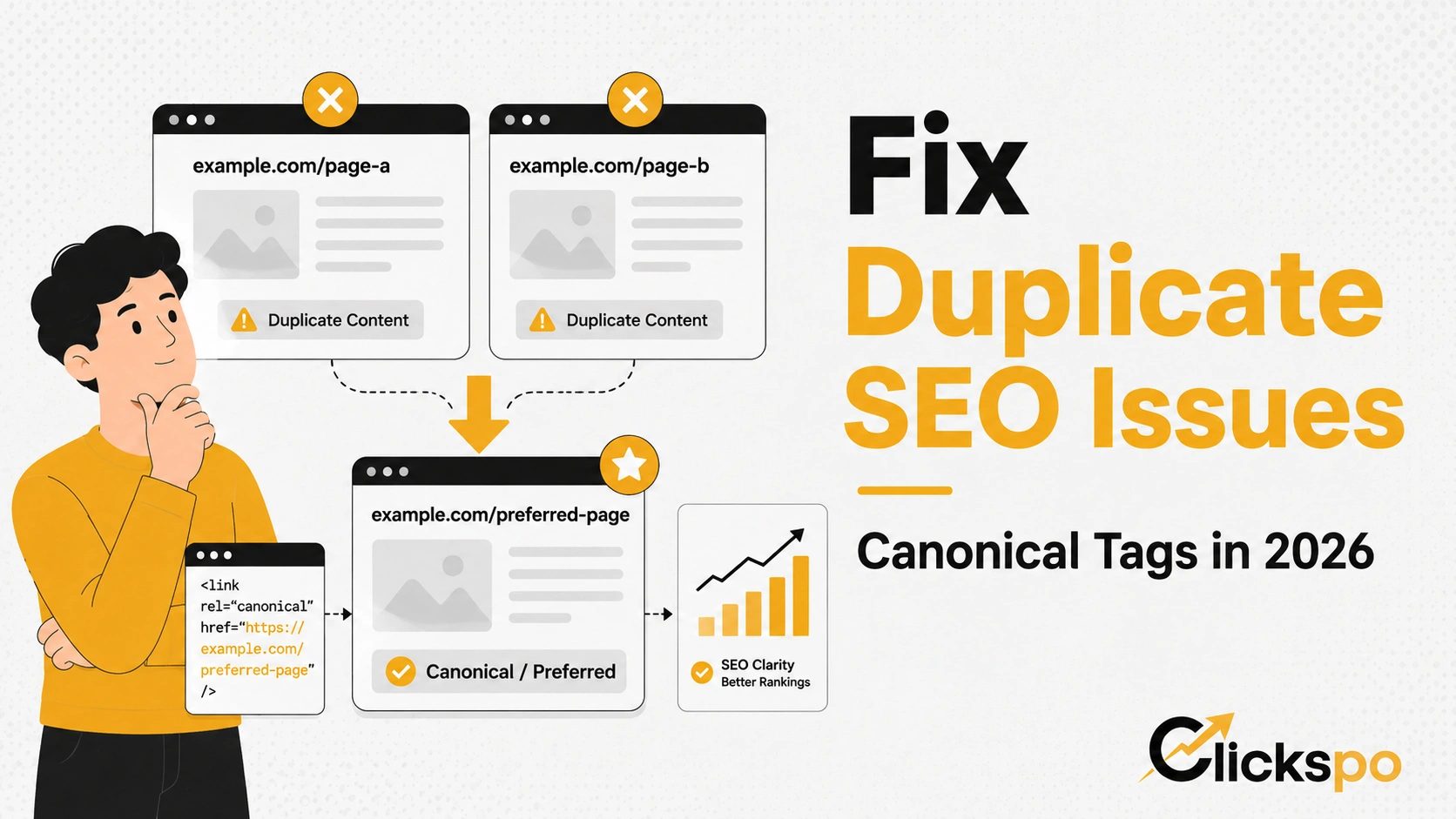
A canonical tag is a line of HTML code placed in the head section of a page. It looks like this:
<link rel="canonical" href="https://www.yoursite.com/preferred-page/" />
Its job is to tell search engines which version of a URL you consider the definitive one. This matters because the same content can often be accessed via multiple different URLs without you having deliberately created duplicates.
Consider a simple example. A product page on an e-commerce site might be accessible at all of the following addresses simultaneously:
- https://www.example.com/product/blue-shirt
- https://example.com/product/blue-shirt (without www)
- https://www.example.com/product/blue-shirt?ref=homepage
- https://www.example.com/product/blue-shirt?sort=price
- https://www.example.com/product/blue-shirt/ (trailing slash variation)
From a user’s perspective, these all show the same page. From Google’s perspective, these are technically different URLs, each of which could be interpreted as a separate piece of content. Without a canonical tag pointing to the definitive version, Google has to guess which one to treat as the primary URL and which to ignore. When Google guesses wrong, or spreads its attention across multiple versions, the page’s authority gets diluted and your rankings suffer.
The canonical tag is your instruction to Google on how to resolve that ambiguity.
Why Canonical Tags Still Matter in 2026
A common argument for deprioritising canonical tags is that Google has become sophisticated enough to detect and consolidate duplicate content on its own. This is partially true. Google does apply automatic canonicalisation when it detects identical or near-identical content across multiple URLs. But relying on Google to make that determination correctly, without explicit guidance from you, introduces unnecessary risk for several reasons.
First, Google’s automatic canonicalisation is a hint, not a guarantee. Google may choose a different canonical than the one you intended, particularly if signals conflict. If your site sends mixed messages through inconsistent internal links, multiple redirect chains, or competing hreflang annotations, Google’s automated choice may not match what you want.
Second, the consequences of incorrect canonicalisation compound over time. If Google treats a URL parameter version of your page as the canonical instead of the clean URL, any backlinks pointing to that page consolidate their authority signal around the wrong version. Backlink equity accrues to a URL that may not be the one you are optimising.
Third, for Hong Kong businesses running bilingual websites with both English and Traditional Chinese versions, canonical tags interact directly with hreflang annotations. Getting this relationship wrong is one of the most common sources of international SEO errors we find during technical SEO audits. The canonical and hreflang signals need to be consistent and complementary, not contradictory.
Our Ahrefs research shows that “canonical tag” generates 3,700 monthly searches in the US market at a keyword difficulty of 58, and “canonical URL” generates 2,300 monthly searches with traffic potential reaching 4,800. These are solid volume numbers for a technical topic, which confirms that practitioners across markets treat this as an active area of concern rather than settled knowledge.
The Most Common Scenarios Where Canonical Tags Are Essential
Not every site has an urgent canonical problem. The situations where getting canonical tags right makes the most material difference are:
E-commerce sites with product filtering and sorting. Filtered category pages and sorted product listings create URL parameter variations at scale. A clothing retailer might have dozens of URL variants for a single category page based on size, colour, price range, and sort order filters. Without canonical tags pointing back to the base category URL, you risk diluting that page’s authority across dozens of near-duplicate variants.
Sites syndicated across multiple domains. If your content is republished on partner sites, aggregators, or news feeds, the canonical tag on the original article should point back to your own URL. This signals to Google that your version is the original and ensures the syndicated versions do not outrank or dilute your own page.
Paginated content. Blog archives, product listings, and forum threads that span multiple pages can create canonicalisation questions. Page two and beyond should either be handled with self-referencing canonicals or through careful consideration of which pages should be independently indexed.
HTTP and HTTPS mixed signals. If your site was historically on HTTP and migrated to HTTPS, but some internal links or external references still point to the HTTP version, canonical tags reinforce the HTTPS version as the definitive one, working in conjunction with the 301 redirect you should already have in place.
Print or mobile versions of pages. Some older site architectures serve separate mobile URLs or print-friendly versions of pages. Canonical tags on these alternate versions should point back to the primary desktop or standard URL.
Near-duplicate landing pages. Businesses that run similar service pages targeting slightly different geographic areas or audiences sometimes create near-duplicate pages with minimal content differences. Canonical tags help manage how Google treats these in relation to each other, though the better long-term solution is to differentiate the content meaningfully. This is something our team addresses when doing keyword research and content planning for local businesses in Hong Kong.
How Google Treats Canonical Tags: Hints vs Directives
This is the nuance that most guides skip over and that causes the most practical problems. Google treats the canonical tag as a hint, not a directive. This is a meaningful distinction.
A directive is an instruction Google must follow. A hint is a suggestion Google will consider alongside other signals before making its own decision. The canonical tag falls into the hint category.
In practice, this means Google may choose to honour your canonical tag, or it may override it if other signals contradict your stated preference. Google is more likely to override your canonical in these situations:
| Scenario | Google’s Likely Response |
|---|---|
| Canonical points to a page blocked by robots.txt | Override — Google cannot verify the canonical destination |
| Canonical points to a noindex page | Often ignored or reversed — the destination is explicitly excluded |
| Canonical points to a page with significantly different content | Override — Google detects the pages are not true duplicates |
| Internal links consistently point to a different URL than the canonical | May override in favour of the more internally-linked version |
| Canonical chain exists (page A canonicals to B, B canonicals to C) | Simplified — Google may collapse to A canonicalising directly to C, or ignore the chain |
| Self-referencing canonical on the correct URL | Honoured — this is the ideal state |
Understanding this helps you audit your own site more effectively. If you set a canonical and Google is not honouring it, the first place to look is whether any of these conflicting signals exist.
Self-Referencing Canonicals: Should Every Page Have One?
A self-referencing canonical is when a page includes a canonical tag that points to itself. For example, a page at https://www.example.com/seo-services/ includes the tag <link rel="canonical" href="https://www.example.com/seo-services/" />.
This is considered best practice for all indexable pages, and our team implements it as a default across every client site we manage. The reasons are straightforward:
- It removes ambiguity. Even if a URL can technically be accessed without www, with a trailing slash, or with minor parameter variations, a self-referencing canonical explicitly designates the URL structure Google should treat as canonical.
- It provides a defensive layer against URL manipulation. Some URL parameters can be appended by advertising platforms, affiliate programmes, or referral systems. A self-referencing canonical limits the risk that these tracked URLs get treated as separate pages.
- It is low effort and has no downside when implemented correctly. WordPress plugins like Yoast SEO and Rank Math add self-referencing canonicals automatically. Most other major CMS platforms handle this natively.
Platform-Specific Canonical Handling for Hong Kong Sites
How canonical tags are implemented and managed varies by platform, and getting the defaults right matters more than most people realise.
WordPress handles canonical tags through SEO plugins in almost all cases. Yoast SEO and Rank Math both add self-referencing canonicals automatically to all published pages. Both also allow you to override the canonical on a per-page basis. The most common WordPress canonical issue we encounter is tag and category archive pages that create near-duplicate content with the posts they contain. Configuring these to noindex or setting appropriate canonicals is a routine part of a WordPress SEO setup.
Shopify automatically generates canonical tags for all product, collection, and blog pages pointing to the clean URL version. This handles the most common e-commerce duplication scenarios. However, Shopify’s canonical implementation has one known quirk: product pages accessed through a collection URL (e.g. /collections/shirts/products/blue-shirt) receive a canonical pointing to the standalone product URL (/products/blue-shirt). This is correct behaviour, but it can confuse site owners who notice the URL in the browser differs from the canonical. Our Shopify SEO guide addresses this in more detail.
Wix generates canonical tags automatically and allows per-page overrides through the SEO settings panel. The main Wix canonical consideration is ensuring that URL structure changes after a site migration are properly reflected in canonical tags, since Wix URLs are not always intuitive to manage. See our Wix SEO guide for specifics.
Custom-built sites require canonical tags to be implemented at the development level. This is where we most commonly find missing or incorrect canonicals, particularly on older sites that predate widespread awareness of the tag. A technical SEO audit will surface these gaps quickly.
Canonical Tags and Bilingual Sites in Hong Kong
Hong Kong businesses frequently operate websites in both English and Traditional Chinese. The intersection of canonical tags and hreflang annotations is one of the more technically demanding areas of multilingual SEO, and it is one we handle regularly.
The correct relationship is straightforward in principle. Each language version of a page should self-canonicalise, meaning the English version’s canonical points to itself, and the Chinese version’s canonical points to itself. Neither should canonical to the other. The hreflang annotations then signal to Google that these two self-canonicalising pages are language alternates of each other.
The most common error we see is a Chinese page that canonicals back to the English version of the same page. This effectively tells Google to ignore the Chinese page as a duplicate, which undermines the entire purpose of having a localised version and prevents it from appearing in Traditional Chinese search results.
If you are managing a bilingual site and are unsure whether your canonical and hreflang setup is correctly configured, this should be an early priority in any SEO review.
Diagnosing Canonical Issues on Your Site
The most efficient way to identify canonical problems across your site is through Google Search Console combined with a crawl tool. In Search Console, the Coverage report shows you pages categorised as “Duplicate, Google chose different canonical than user” — this is the clearest signal that your stated canonical is being overridden. Understanding why Google made a different choice is the diagnostic step that follows.
For a crawl-level audit, Screaming Frog and Ahrefs Site Audit both surface canonical issues at scale, including pages with missing canonicals, conflicting canonicals, canonical chains, and canonicals pointing to redirected or non-existent URLs. These are the four issue types that appear most frequently and that have the most direct impact on how your pages are indexed and ranked.
FAQs About Canonical Tags and SEO
Does a canonical tag directly improve my rankings?
Not directly. The canonical tag manages how Google consolidates authority signals across duplicate or near-duplicate URLs. The improvement it creates is indirect: by ensuring Google treats the correct URL as the primary version, all backlinks, internal links, and engagement signals pointing to that URL consolidate correctly rather than being spread across multiple variants. Pages with consolidated authority tend to rank better than pages with diluted authority.
What happens if I set a canonical tag incorrectly?
It depends on the error. A canonical tag pointing to a redirected URL creates a chain that Google has to resolve. A canonical pointing to a noindex page may result in your page being excluded from the index. A canonical pointing to a completely different page could transfer your page’s authority to the wrong destination. In all cases, Google may simply ignore an incorrect canonical if it detects the signal does not match the page’s content or other signals.
Should I use canonical tags or 301 redirects to handle duplicate content?
They serve different purposes. A 301 redirect permanently redirects users and search engines to the new URL, removing the original from circulation entirely. A canonical tag keeps both URLs accessible while designating one as the preferred version for indexing. Use a 301 redirect when you want the original URL to stop being used entirely. Use a canonical when you need the URL to remain accessible but want a different version to receive the SEO credit.
Can I use a canonical tag to point to a page on a completely different domain?
Yes, cross-domain canonicals are supported by Google. They are typically used when content is syndicated across multiple sites. The canonical on the syndicated version points back to the original publisher’s URL, ensuring that the original site receives the indexing and ranking credit. This works in practice but requires the destination domain to be one Google trusts, and it is honoured as a hint rather than a directive.
How do I check which canonical Google has actually chosen for my pages?
The most direct method is to use Google Search Console’s URL Inspection tool. Enter the URL of the page you want to check and look at the “Google-selected canonical” field in the Coverage section. If the canonical Google has selected differs from the one you declared in your HTML, that gap tells you there is a conflict to investigate.
Do canonical tags affect how my pages perform in AI-generated search results?
This is an emerging question as AI Overviews and other generative search features become a larger part of the results landscape. The relationship is not definitively documented by Google, but the underlying principle holds: pages with clear canonical signals are better understood by Google’s systems. Content on a properly canonicalised page is more likely to be treated as authoritative for the purposes of AI-generated summaries than content on a page Google has uncertainty about. If AI search optimisation is a priority for your business, our team covers the broader implications in our guide to AI search optimisation.